Mysql无法登录
本文主要介绍2种场景导致的无法登录:忘记root密码、数据库文件损坏。
忘记root密码导致无法登录
当登陆mysql输入的密码错误时,提示Access denied,可以通过重置密码进行修复(以mariadb为例)。
[jolycao2@VM_108_46_centos ~]$ mysql -uroot -p12345
ERROR 1045 (28000): Access denied for user 'root'@'localhost'
(using password: YES)
修改/etc/my.cnf文件
在/etc/my.cnf中添加入如下配置项,用户可以无需密码就可以登陆数据库。
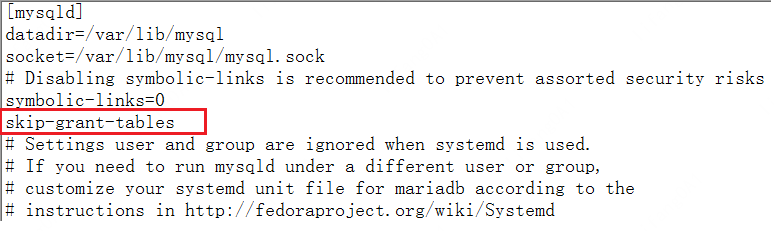
登陆数据库
[root@VM_108_46_centos ~]# mysql
Welcome to the MariaDB monitor.  Commands end with ; or \g.
Your MariaDB connection id is 40948
Server version: 5.5.60-MariaDB MariaDB Server
Copyright (c) 2000, 2018, Oracle, MariaDB Corporation Ab and others.
Type 'help;' or '\h' for help. Type '\c' to clear the current input statement.
MariaDB [(none)]>
重启mysql服务
sudo systemctl restart mariadb.service
登陆数据库修改密码
[root@VM_108_46_centos ~]# mysql
Welcome to the MariaDB monitor.  Commands end with ; or \g.
Your MariaDB connection id is 40948
Server version: 5.5.60-MariaDB MariaDB Server
Copyright (c) 2000, 2018, Oracle, MariaDB Corporation Ab and others.
Type 'help;' or '\h' for help. Type '\c' to clear the current input statement.
MariaDB [(none)]> use mysql
MariaDB [mysql]> set password for root@localhost = password('123456');
使用密码登陆数据库
[root@VM_108_46_centos ~]# mysql -uroot -p123456
Welcome to the MariaDB monitor.  Commands end with ; or \g.
Your MariaDB connection id is 40949
Server version: 5.5.60-MariaDB MariaDB Server
Copyright (c) 2000, 2018, Oracle, MariaDB Corporation Ab and others.
Type 'help;' or '\h' for help. Type '\c' to clear the current input statement.
MariaDB [(none)]>
恢复/etc/my.cnf文件
删除下面的 “skip-grant-tables” 配置项。
重启mysql服务
sudo systemctl restart mariadb.service
数据库损坏导致无法登陆
mysql数据库损坏,如数据文件被删除,此时可以通过重装mysql解决。
停止服务
sudo systemctl stop mariadb.service
删除残留的配置/数据文件
sudo rm -f /etc/my.cnf       # 残留的配置文件
sudo rm -rf /var/lib/mysql/   # 残留的数据文件
重新安装
sudo yum install mariadb*
输入命令
sudo mysql_secure_installation
首先是设置密码,会提示先输入密码
Enter current password for root (enter for none):<–初次运行直接回车
设置密码
Set root password? [Y/n] <– 是否设置root用户密码,输入y并回车或直接回车
New password: <– 设置root用户的密码, 比如 123456
Re-enter new password: <– 再输入一次你设置的密码, 123456

其他配置
Remove anonymous users? [Y/n] <– 是否删除匿名用户,回车
Disallow root login remotely? [Y/n] <–是否禁止root远程登录,回车,
Remove test database and access to it? [Y/n] <– 是否删除test数据库,回车
Reload privilege tables now? [Y/n] <– 是否重新加载权限表,回车